Enterprise Performance & Goal-Setting Platform
From business plans to performance goals
Designing a scalable Performance workflow inside Allstate's Customer Engagement System that connected annual planning, monthly goals, staff accountability, and actuals tracking.
My contribution was less about designing screens and more about defining the logic behind them — how the workflow should adapt across agency structures, what data should be authoritative at each stage, and how planning and performance should connect without duplicating work.
Some screens and details have been adapted or generalized to protect internal information.
At a glance
Allstate was creating CES to bring together the fragmented tools agents and staff used across customer management, performance, planning, communications, and daily operations — consolidating them into a single connected platform.
Agency leaders needed to turn annual business plans into monthly goals, distribute them across complex agency structures, and track actuals against targets — with no connected workflow to support any of it.
Agencies could have one location, multiple locations, multiple states, multiple primary levels, and separate annual business plans by state. The workflow needed to adapt without overburdening simple agencies or failing complex ones.
I contributed to the broader CES architecture alongside other platform designers, then owned the Performance UX work — designing the Manage Goals workflow by mapping scenarios, defining source-of-truth rules, modeling edge cases, and prototyping the flow.
The result was a scalable goal-setting flow that pulled business plan values into Manage Goals as a read-only starting point, allowed monthly goals to be created or edited, enabled distribution to locations and staff, and connected saved goals to performance tracking.
This work mattered because performance goals were not just reporting data — they shaped how agencies planned, coached staff, tracked progress, and connected business strategy to daily execution.
The broader platform: Customer Engagement System
CES was designed to consolidate the many Allstate and third-party applications agents and staff used to manage customer relationships, business performance, planning, communications, and daily work. The goal was to reduce tool-switching and create a more connected enterprise experience.
I partnered with other CES designers and cross-functional teams on platform architecture — thinking through how major areas should connect and how Performance would fit into the broader ecosystem. My dedicated ownership was the Performance product area, with Manage Goals as the deepest workflow.
The focused workflow inside Performance
Performance was one area within CES focused on helping agency leaders understand goals, actuals, planning, and staff performance. Manage Goals was the connective layer between annual planning and day-to-day performance management.
The challenge was designing a workflow that could adapt across agency structures, preserve the right source of truth, and connect directly to performance tracking.
The problem was fragmentation
Agency leaders managed annual business plans, monthly goals, and performance tracking across disconnected experiences. Business plan data didn't flow into monthly goal setting, and goals weren't connected to location allocation, staff accountability, or actuals tracking — leaving no clear link between planning and daily execution.
The workflow had to be simple enough for single-location agencies, but flexible enough for agencies operating across multiple states, locations, and books of business.
- Annual business plan
- Monthly goals set without plan context
- Location allocation manual, no goal reference
- Staff expectations untracked or estimated
- Performance tracking no goal baseline to compare against
- Annual plan
- Monthly goals
- Location allocation
- Staff goals
- Performance tracking
Who the workflow needed to support
The system needed to support different roles without forcing every user into the same workflow or exposing information inappropriately.
| User | Job to be done |
|---|---|
| Agency owner | Translate annual business plans into monthly goals and distribute them across locations and staff. |
| Office manager | Help set, adjust, and monitor staff goals at the location level. |
| Staff / LSP | Understand individual expectations, targets, and progress toward goals. |
| Sales leader | See how agency planning connects to monthly execution and performance outcomes. |
My role across platform architecture and workflow design
While CES was shaped by a broader group of UX designers and cross-functional teams, I was the sole UX designer dedicated to the Performance product area. That meant I was responsible for shaping how Performance connected to the broader CES architecture while also designing the detailed Manage Goals workflow — from systems modeling and edge-case mapping through prototyping and team alignment.
Partnered with other CES designers to ensure Performance fit the broader platform architecture, navigation model, and experience patterns.
As the sole UX designer on Performance, I designed the Manage Goals workflow across business plan context, monthly goals, location distribution, staff allocation, and actuals tracking.
Partnered with business partners and cross-functional teams to create state matrices, flow artifacts, and behavior models that helped clarify business rules, edge cases, and implementation decisions.
Key Alignment Artifacts
Before implementation, I partnered with business partners and cross-functional teams to define the behavior model behind the experience. These artifacts helped clarify workflow rules, planning integration, and agency-specific edge cases.
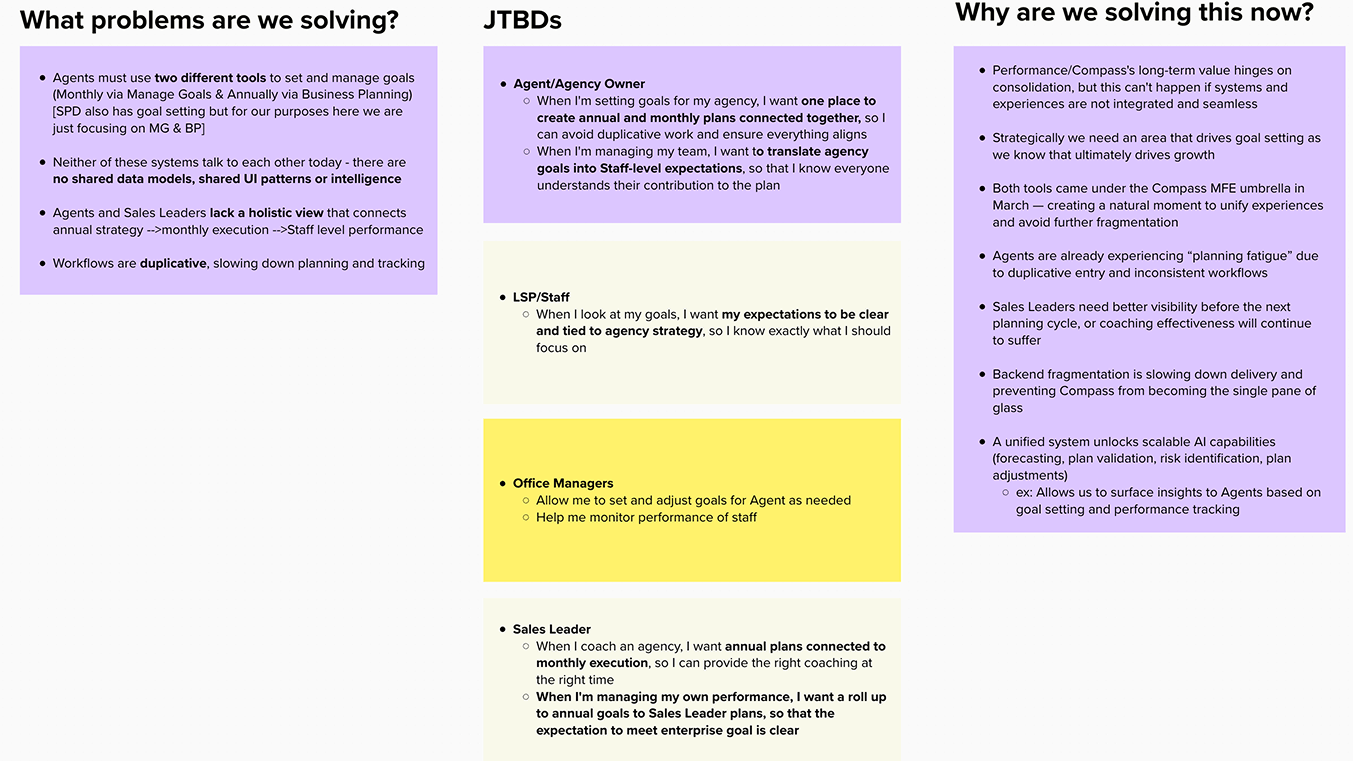
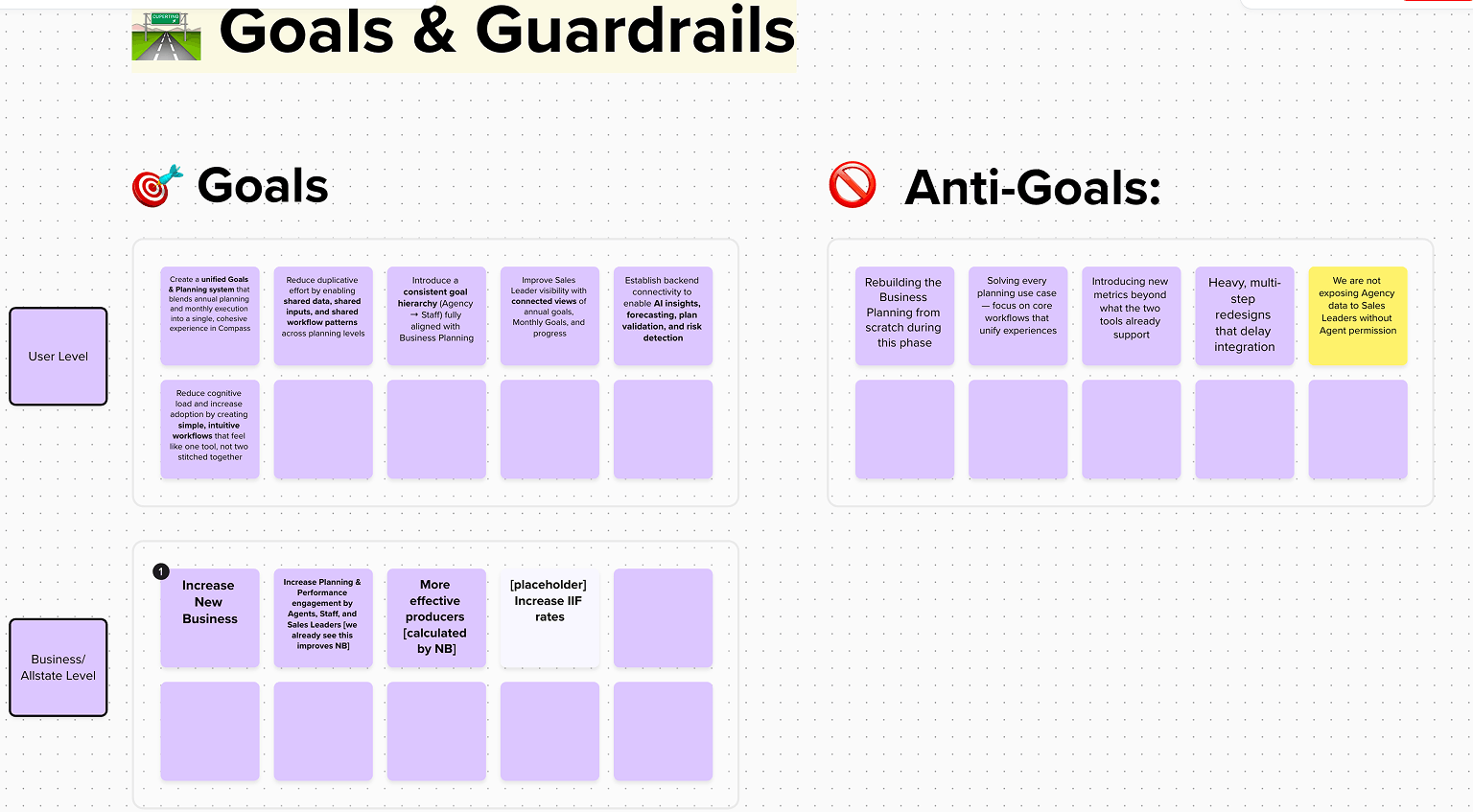
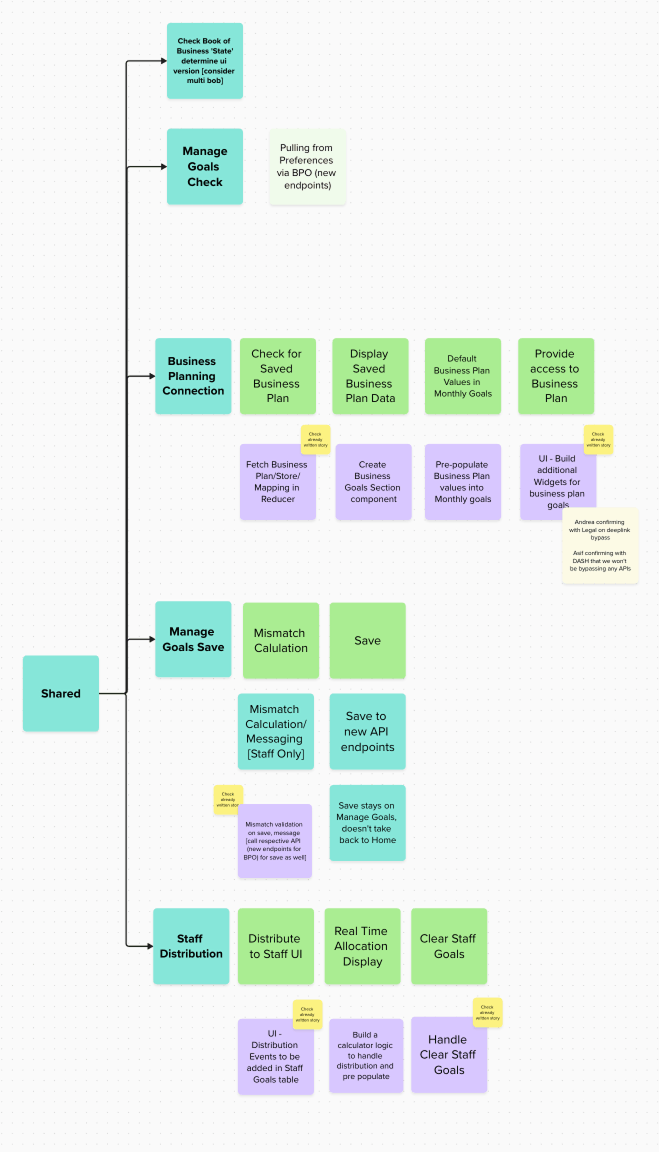
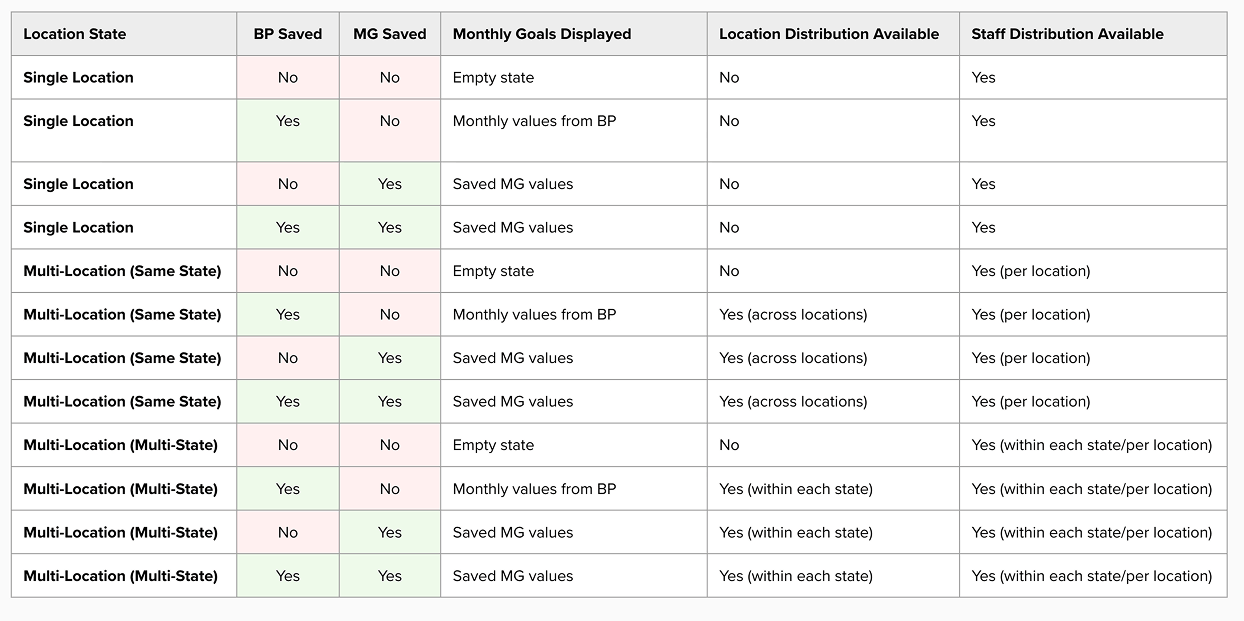
Modeling Workflow Behavior Across Agency Structures
A model of how the workflow should adapt across agency structures, planning states, and saved goal states — the foundation for both design and engineering.
Designing for real agency complexity
The hardest part of the project was not the interface. It was modeling how goal setting should behave across different agency structures and saved states.
Variables I had to account for
Simplified behavior matrix
| Scenario | Experience behavior |
|---|---|
| Single location, no business plan, no monthly goals | Start with empty monthly goal setup |
| Single location, saved business plan | Use business plan values as the starting point |
| Single location, saved monthly goals | Show saved monthly goals as source of truth |
| Multi-location, same state | Enable distribution across locations |
| Multi-location, multi-state | Enable distribution within each state or primary level |
| Business plan + saved monthly goals (completed/reference state — not a setup path) | Saved monthly goals remain source of truth; business plan values are contextual and do not overwrite |
| Location goals set | Enable staff allocation within that location |
| Allocation mismatch | Show real-time guidance without unnecessary blocking |
These agency structures, saved states, and source-of-truth rules were mapped collaboratively with business partners and engineering to determine what users should see across each scenario.
Designing across 9 core workflow scenarios
The active workflow needed to account for three setup/editing states across three agency structures. A fourth completed state — when both a Business Plan and Monthly Goals already existed — was handled as a reference/editing state because the user did not need the same setup guidance.
9 core workflow scenarios
- Saved monthly goals remain the source of truth
- Business Plan values are contextual
- Business Plan values do not overwrite saved goals
- Users can view, adjust, or edit existing goals
- Distribution options remain available based on agency structure
Example scenarios
Business Plan + No Goals + Single Location
- Display annual business plan values
- Use business plan values as starting point
- Allow monthly goal creation
- No location distribution required
No Business Plan + Goals + Multi-location
- Show saved monthly goals as source of truth
- No business plan context to display
- Enable location distribution and adjustments
- Allow location-level and staff-level edits
Business Plan + No Goals + Multi-state / Primary level
- Use business plan values by primary level
- Enable primary level distribution
- Enable location allocation within each primary level
- Enable staff allocation within locations
This was less about interface design and more about systems design — categorizing workflow states by user need: setup from scratch, setup with planning data, editing saved goals, and a completed state where both planning and goals already existed.
Principles that guided the solution
Once monthly goals are saved, they become the source of truth — business plan values can initialize but never overwrite.
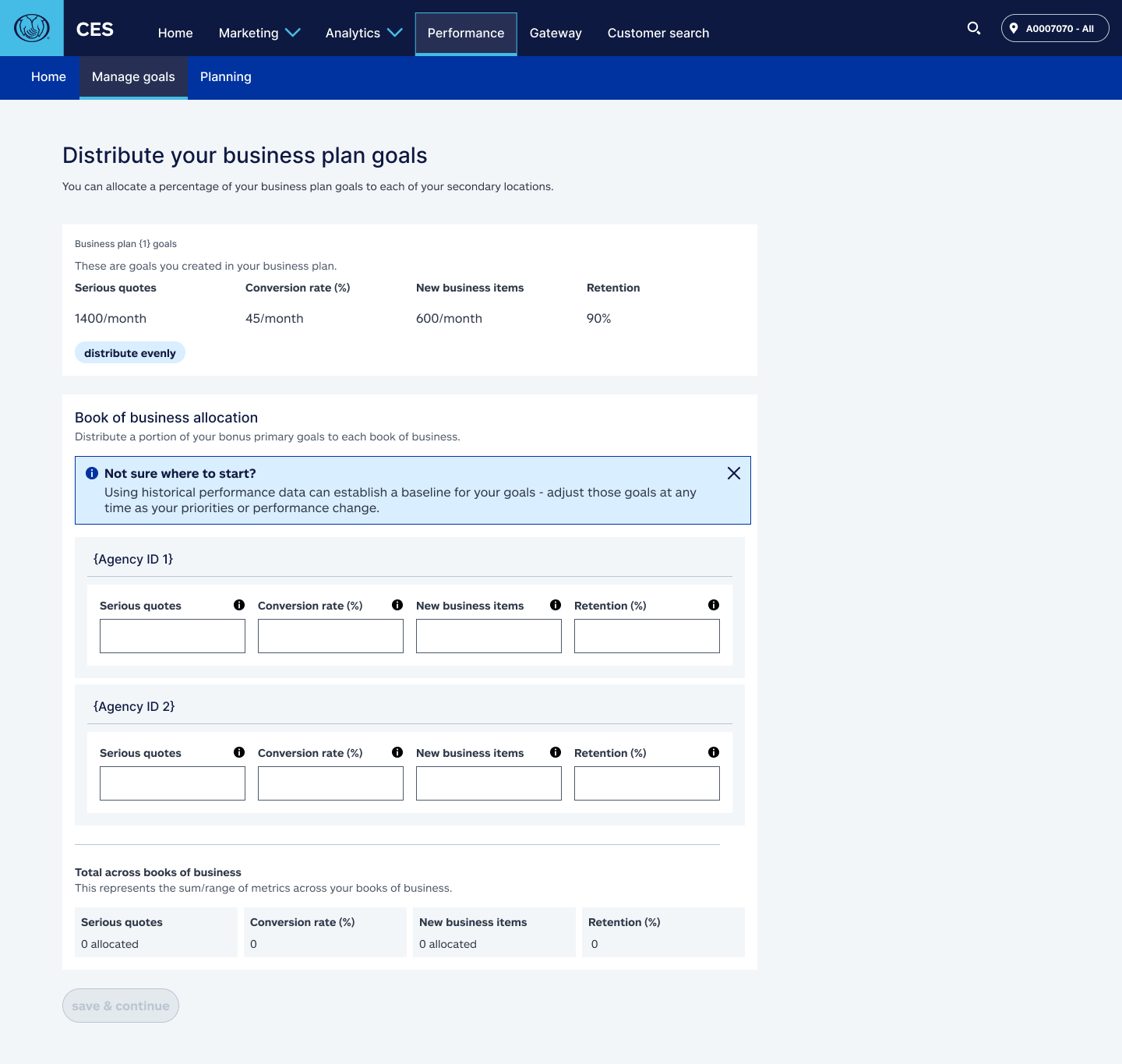
Business plan values appear in Manage Goals for context, but editing them happens in Business Planning — not here.
Distribution controls appear only for multi-location and multi-state agencies, and only when those controls are relevant.
Distribution actions help users allocate goals quickly while still allowing manual adjustment for nuanced situations.
Over- and under-allocation are shown clearly in real time, but the system avoids unnecessary hard stops when leaders need flexibility.
Goal setup feeds directly into Performance, closing the loop between planning and actuals tracking.
The solution
Five steps that took agency leaders from fragmented planning to connected performance management.
Bring business plan context into Manage Goals
When a saved annual business plan existed, Manage Goals displayed the relevant plan values as a starting point for monthly goal creation.
Create or edit monthly goals
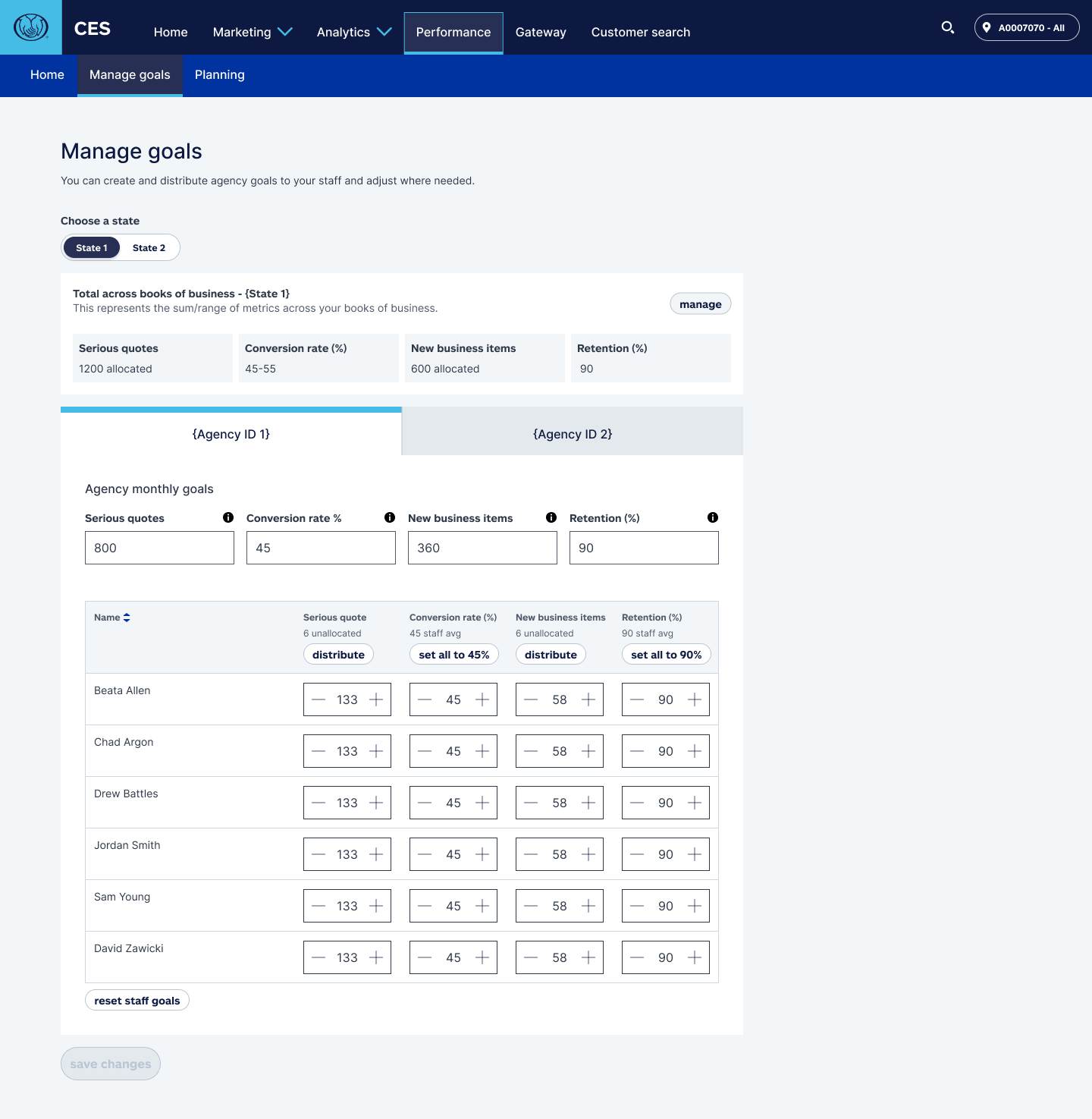
Users could set monthly targets for key performance metrics — serious quotes, conversion rate, new business items, and retention.
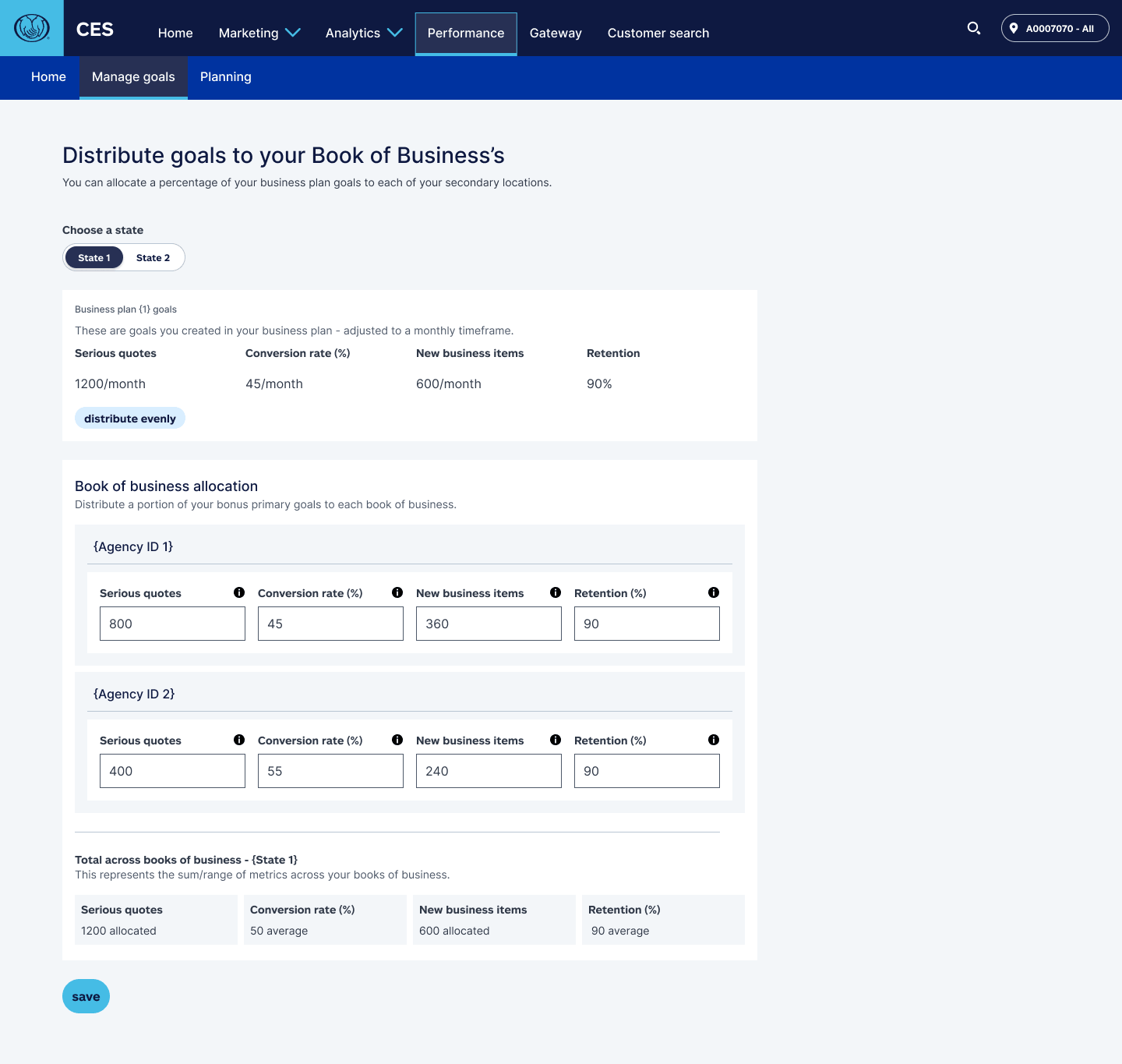
Distribute goals across locations or books
For agencies with multiple locations, the workflow introduced a distribution step so agency-level or primary-level goals could be allocated across locations.
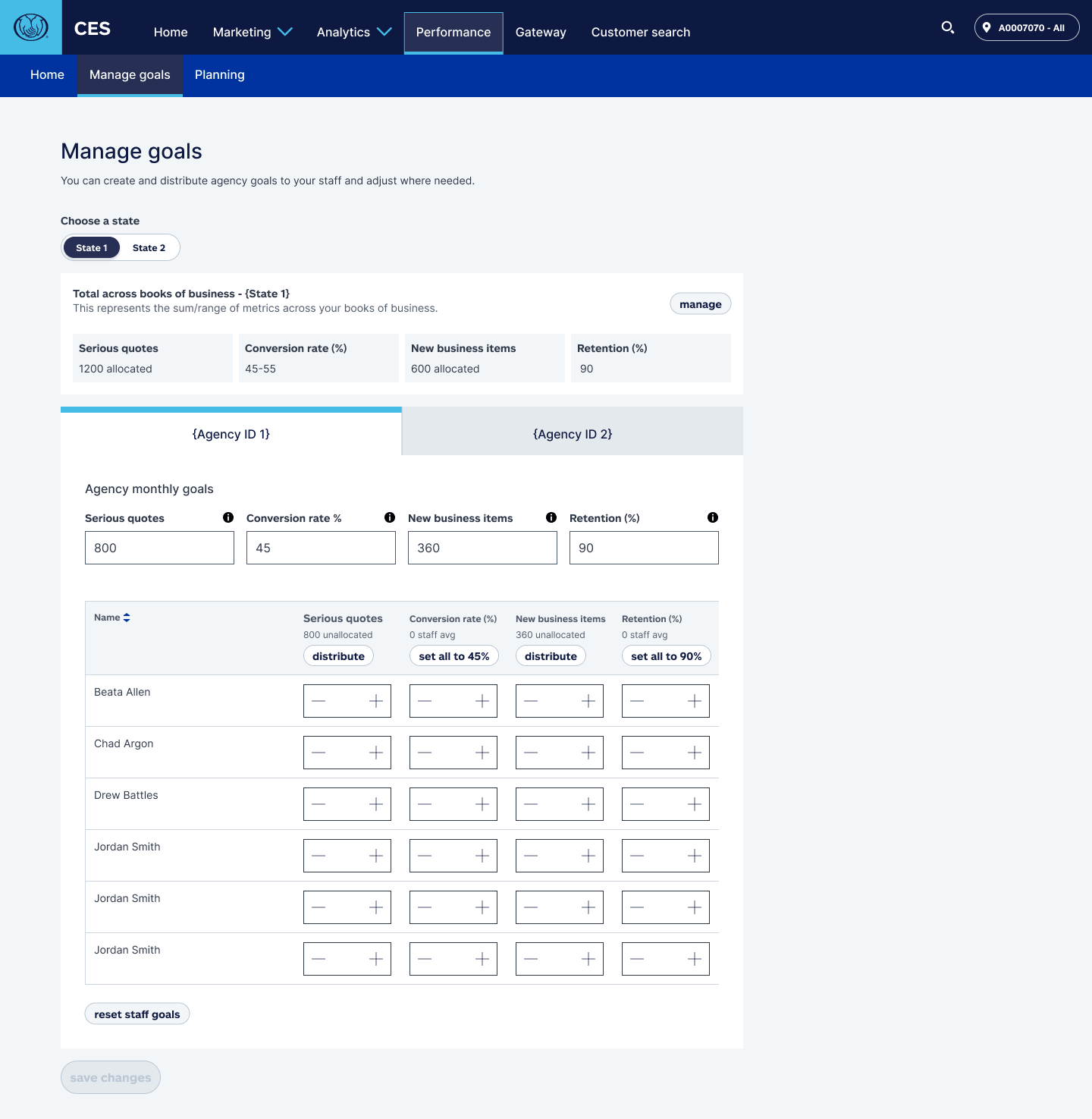
Allocate location goals to staff
Once location goals were set, agency leaders could distribute those goals to individual staff members.
Track actuals against goals
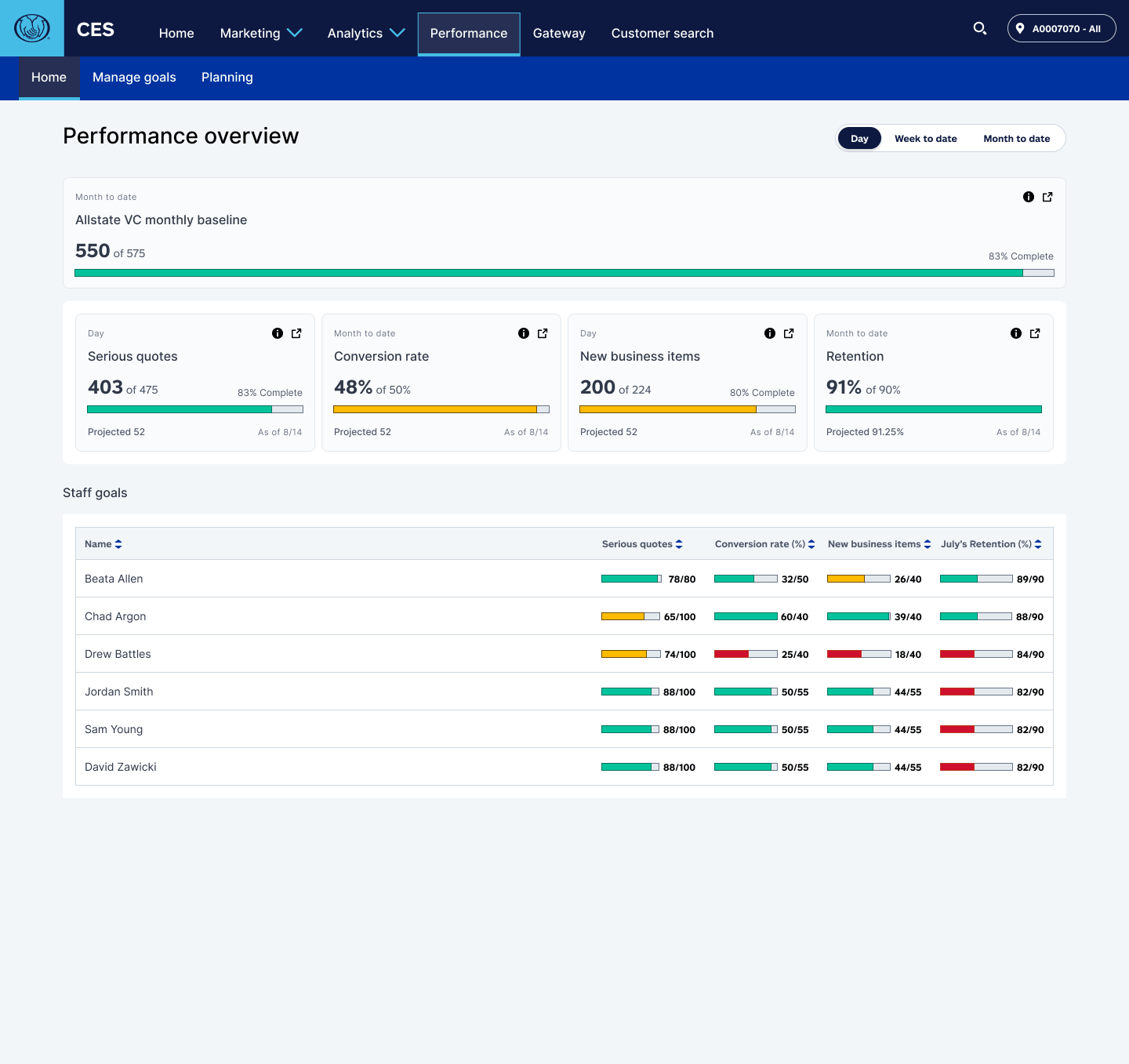
Saved goals appeared in Performance, allowing agency leaders to compare actuals against targets across agency-level and staff-level metrics.
Working across a large enterprise team
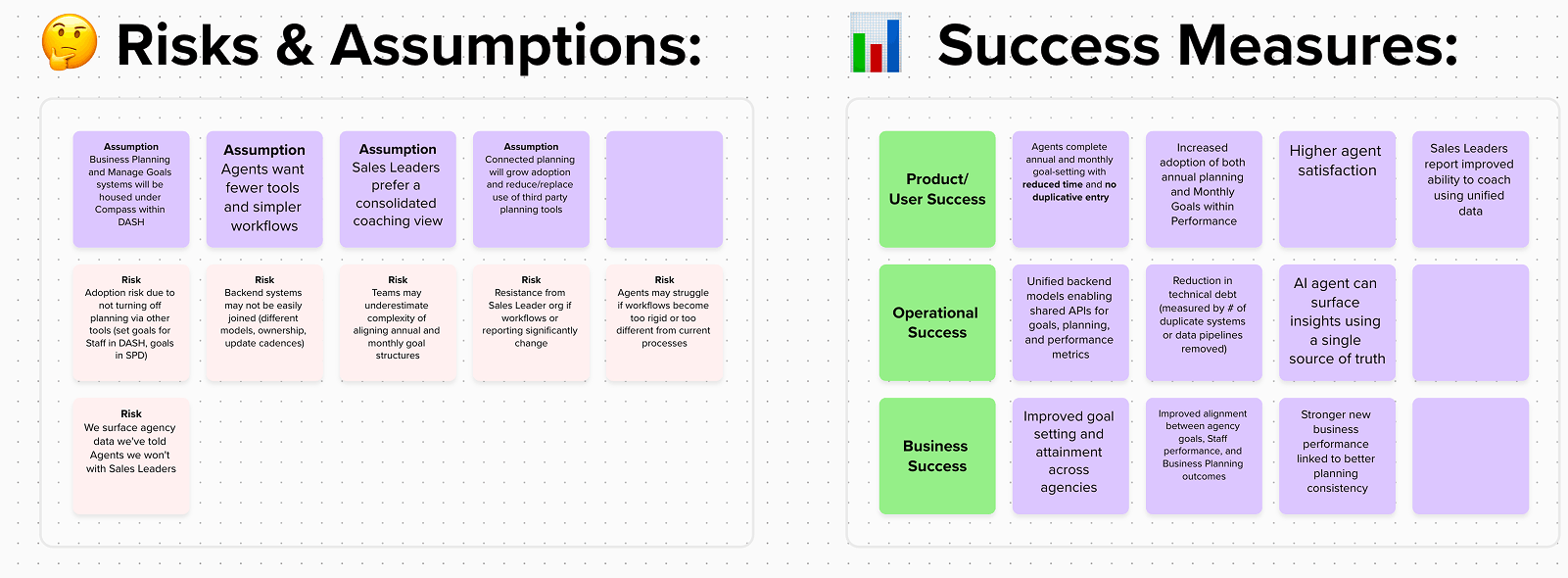
As the sole UX designer on Performance, I partnered closely with other CES designers to maintain platform consistency while working directly with product, engineering, business analysts, and business planning partners on the Manage Goals workflow. Alignment across these teams was essential because the workflow touched multiple systems: annual planning, monthly goals, agency hierarchies, location data, staff structures, performance metrics, reporting, and permissions.
Many of the key artifacts were created through collaboration with business partners, product, engineering, and business analysts. My role was to help translate that shared understanding into UX architecture, workflow behavior, and product decisions.
| Partner | What we aligned on |
|---|---|
| UX designers | CES architecture, Performance patterns, navigation conventions, and visual consistency across the platform. |
| Product / DPM | MVP scope, rollout priorities, user flows, success measures, and decision trade-offs. |
| Business analysts | Agency structure rules, saved-state logic, distribution behavior, and edge case handling. |
| Engineering | API needs, backend dependencies, save behavior, calculation logic, and data availability constraints. |
| Business planning partners | How annual plan values should appear inside Manage Goals, and what could be read-only vs. editable. |
| Leadership / stakeholders | Risks, assumptions, trade-offs, and decision direction across complex edge cases. |
Translating design into buildable behavior
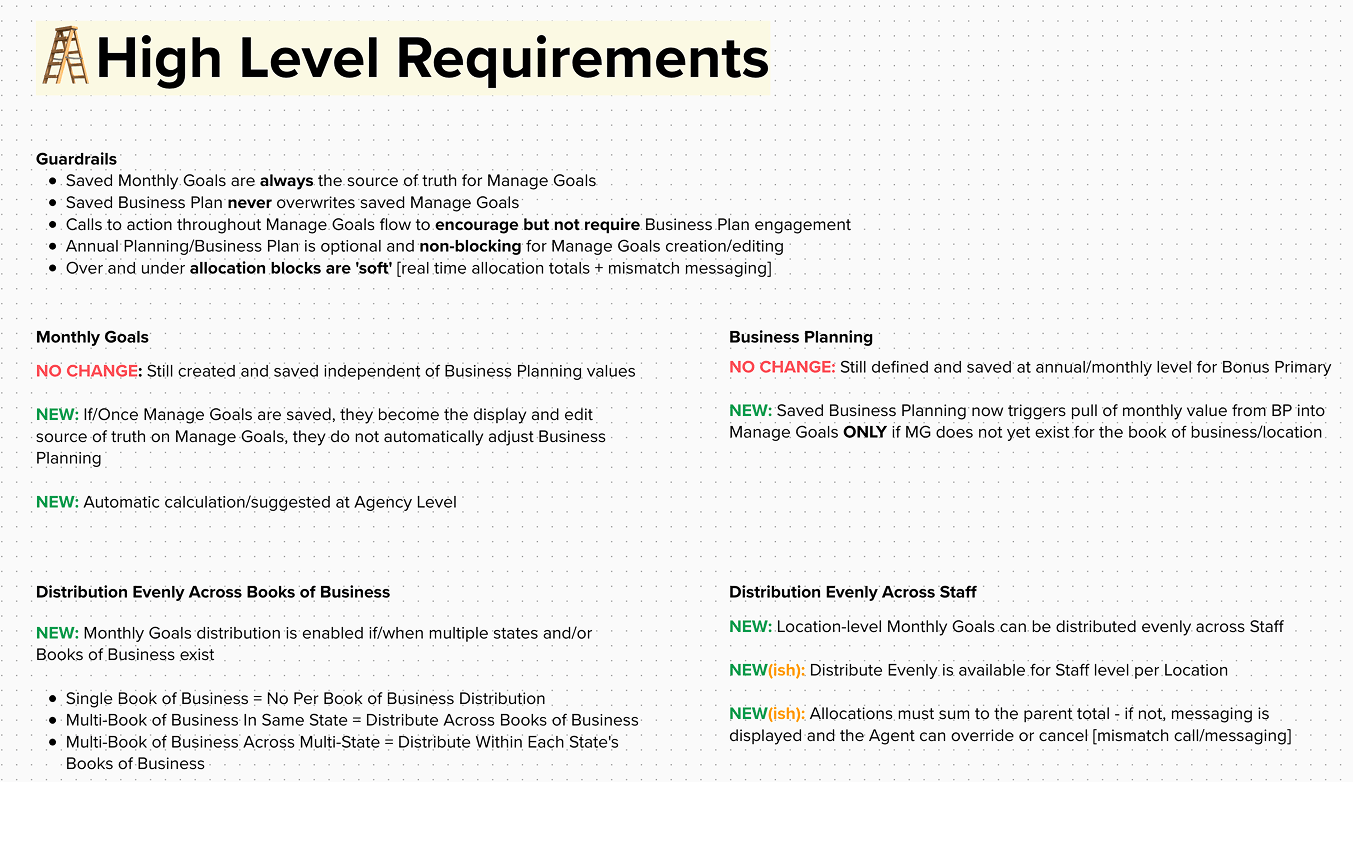
Because the workflow depended on agency structure, saved states, and data availability, the design had to define behavior — not just screens.
This was where design became product behavior.
Key behavioral rules
- Business plan values can initialize Manage Goals only when monthly goals do not already exist.
- Saved monthly goals become the source of truth and are not overwritten by business plan values.
- Business plan values are always read-only inside Manage Goals.
- Single-location agencies do not see location distribution controls.
- Multi-location agencies can distribute goals across locations or books within a state.
- Multi-state agencies distribute goals within each primary level or state separately.
- Staff goals are assigned within the context of a parent location goal.
- Allocation mismatches are visible in real time — hard stops are reserved for critical errors only.
- Saved goals feed automatically into Performance tracking.
What the work made possible
Created a scalable goal-setting framework
The workflow supported simple and complex agency structures, from single-location agencies to multi-state agencies with separate business plans — without overburdening simpler setups.
Clarified planning-to-performance relationships
Annual business plan values could inform monthly goals, while saved monthly goals remained the editable source of truth — preserving the right data hierarchy.
Created cross-functional alignment
Scenario maps, flow diagrams, prototypes, and state matrices — developed collaboratively with business partners, product, and engineering — helped the team align on complex workflow behavior before implementation.
Connected setup to performance visibility
Goals were not isolated setup data. Once saved, they became part of Performance — where agency leaders could track actuals against targets in real time.
Strengthened the broader CES architecture
The work contributed to how Performance fit within the broader CES consolidation initiative — a single connected experience for agents and staff across tools that had previously been separate.
How success was defined
The team defined success across four dimensions.
Increased completion of monthly goal creation, higher adoption of Manage Goals, and reduced abandonment during goal setup.
Reduced duplicate entry between Business Planning and Manage Goals, and increased confidence in the goal-setting workflow.
Shared data between planning and goals, consistent data ownership across the workflow, and simplified support across different agency structures.
Greater alignment between annual plans and monthly execution, improved visibility into agency performance, and stronger accountability at every level.
What this project taught me
This project reinforced that enterprise UX is about designing the system behind the screens: source-of-truth rules, edge-case modeling, team alignment, and workflows that scale across different business structures.
The most valuable work was not the prototypes — it was the behavior models, edge-case matrices, and alignment artifacts built with business partners and cross-functional teams that helped everyone understand exactly what the product should do before anyone wrote a line of code.
The hardest part of this project wasn't designing screens — it was defining the logic that made them possible. I modeled workflow behavior across dozens of agency configurations, aligned product and engineering around a shared state model, and made architecture decisions that had to hold up at enterprise scale. The interface was the last thing I designed.